Changelog

Follow new updates and improvements to AYON.

AYON 1.16.8 - Enhanced Comments and Descriptions
A brand new editor for comments and descriptions, new ways to reuse comments, and a handful of fixes.

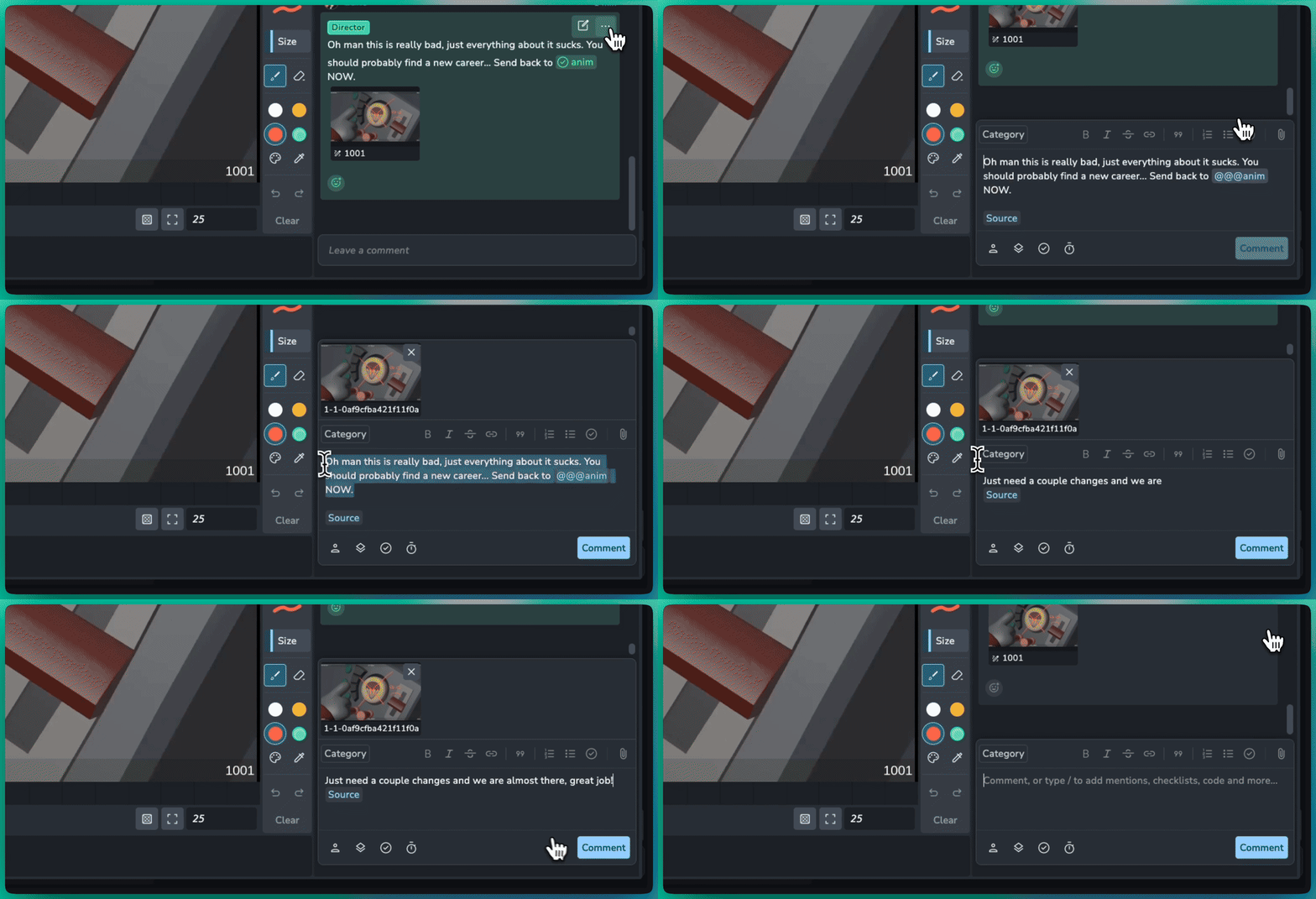
โœ๏ธ New Comment Editor

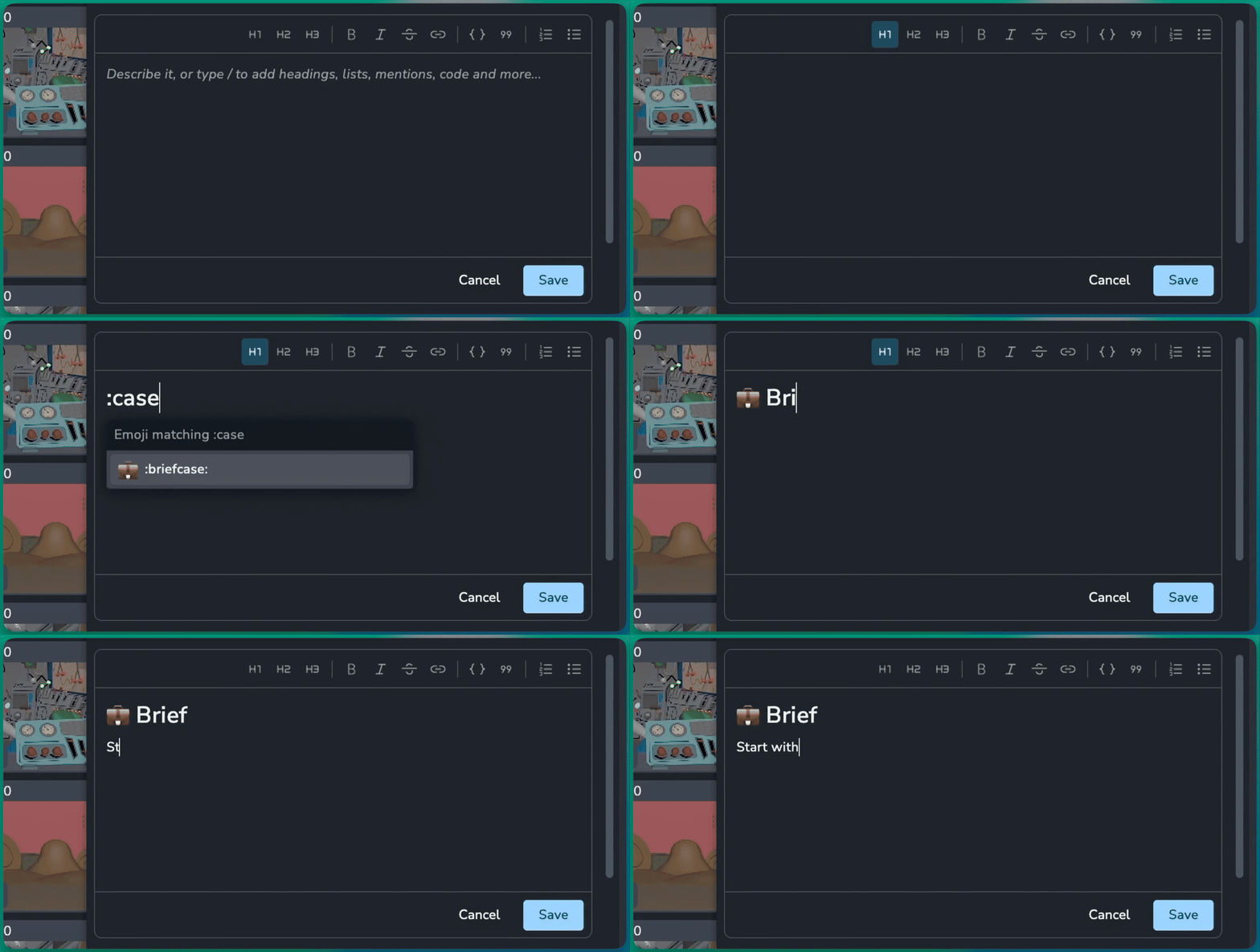
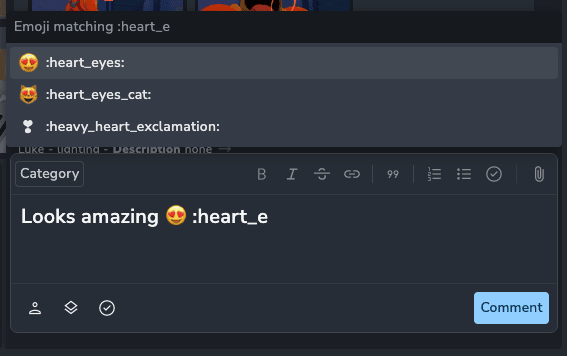
Comments, descriptions and text cells now share one new editor that is quicker to write in and stores plain markdown. For example:

  • Slash menu: Type / to add headings, lists, checklists, quotes, code blocks, images, videos and mentions.

  • Emoji: Type :tada: and pick from your most used emoji.

  • Embeds: Put a YouTube link on its own line and it becomes a player in the comment.

  • Descriptions: Mention users, tasks and versions in a description, the same as in comments.
๐ŸŽž๏ธ Link Comments to Frames

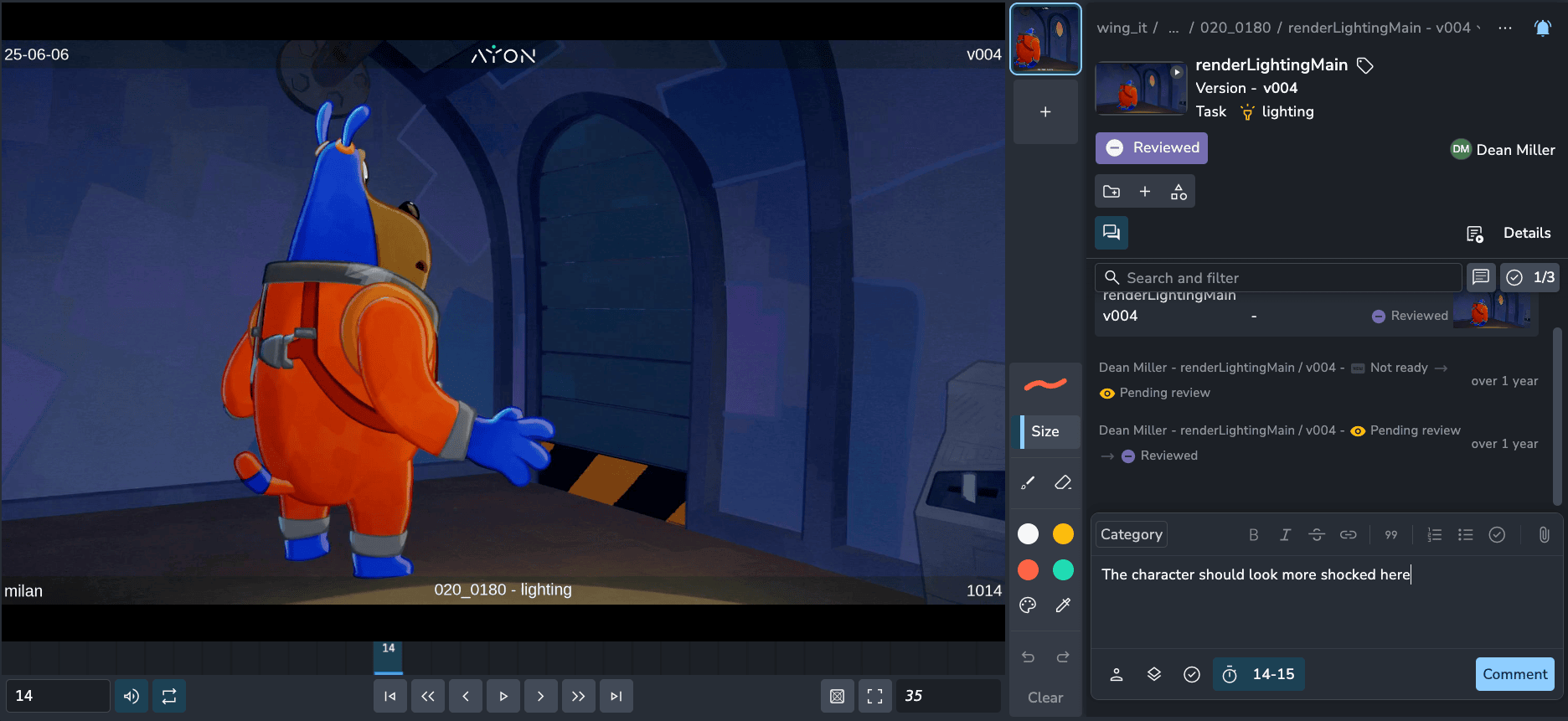
In a review, a new frame button in the comment editor ties your comment to the exact frame it is about. For example:

  • Single frame: Click the button to link the comment to the current frame.

  • Range: Stretch the marker to link a range of frames instead. Clicking the button again removes the link.

  • Jump to it: A posted comment shows a frame chip. Clicking it jumps the player to that frame, and sets the in and out points for a range.
๐Ÿ“‹ Duplicate Comments

Pick Duplicate to new comment from the comment menu to copy a comment into your own comment box, ready to adapt and post. For example:

  • Client feedback to artist notes: Copy a client's comment, reword it, choose a category and post it for the artist.

  • Attachments come along: Images, attachments and annotations are copied, and the original comment is never changed.

  • No names passed on: The author's name is left out, and an "Original comment" link points back to the source instead.
๐ŸŽ‰ New Features

  • Comment editor: Link comments to frames #2370

  • Comments: Duplicate to new comment #2376

  • Comments: Copy a comment's text and link to comments, shown as chips #2376

โค๏ธ Improvements

  • Editor: New markdown editor for comments, descriptions and text cells #2364

  • Comments: Admins can edit anyone's comment #2376

  • Slicer: Search with pasted lists of names #2425

  • Thumbnails: Folders and tasks now show the thumbnail of their latest version #1144

  • Settings: Migrate the settings of a single addon between two versions #1097

๐Ÿ› ๏ธ Bugfixes

  • Table: Editing a cell with several selected now applies to all of them for text, number, date and boolean columns #2369

  • Delete: Restore the force delete dialog for folders with children #2377

  • Assignees: Use the users enum source for assignee options #2390

  • Settings: Restore error details when saving addon settings fails #2428

  • Settings: Support conditional enums on multiselect fields #2430

  • Tables: Rows with empty sort values are no longer skipped when paging #1142

  • Tables: Fix sorting by numeric attributes #1175

  • Tasks and folders: Fix createdBy issues #1147

๐Ÿ“š Resources

Note: Ynput cloud hosted instances have automatic, scheduled updates. Self-hosted servers require you to update yourself How to Update Your AYON Server.
Server

AYON 1.16.7 - Dynamic Enums & Multi-Slicing

Enum attributes that keep themselves up to date, a slicer that can slice by several things at once, more context on the Products page and tons of enhancements and bug fixes.

๐Ÿ”„ Dynamic Enums

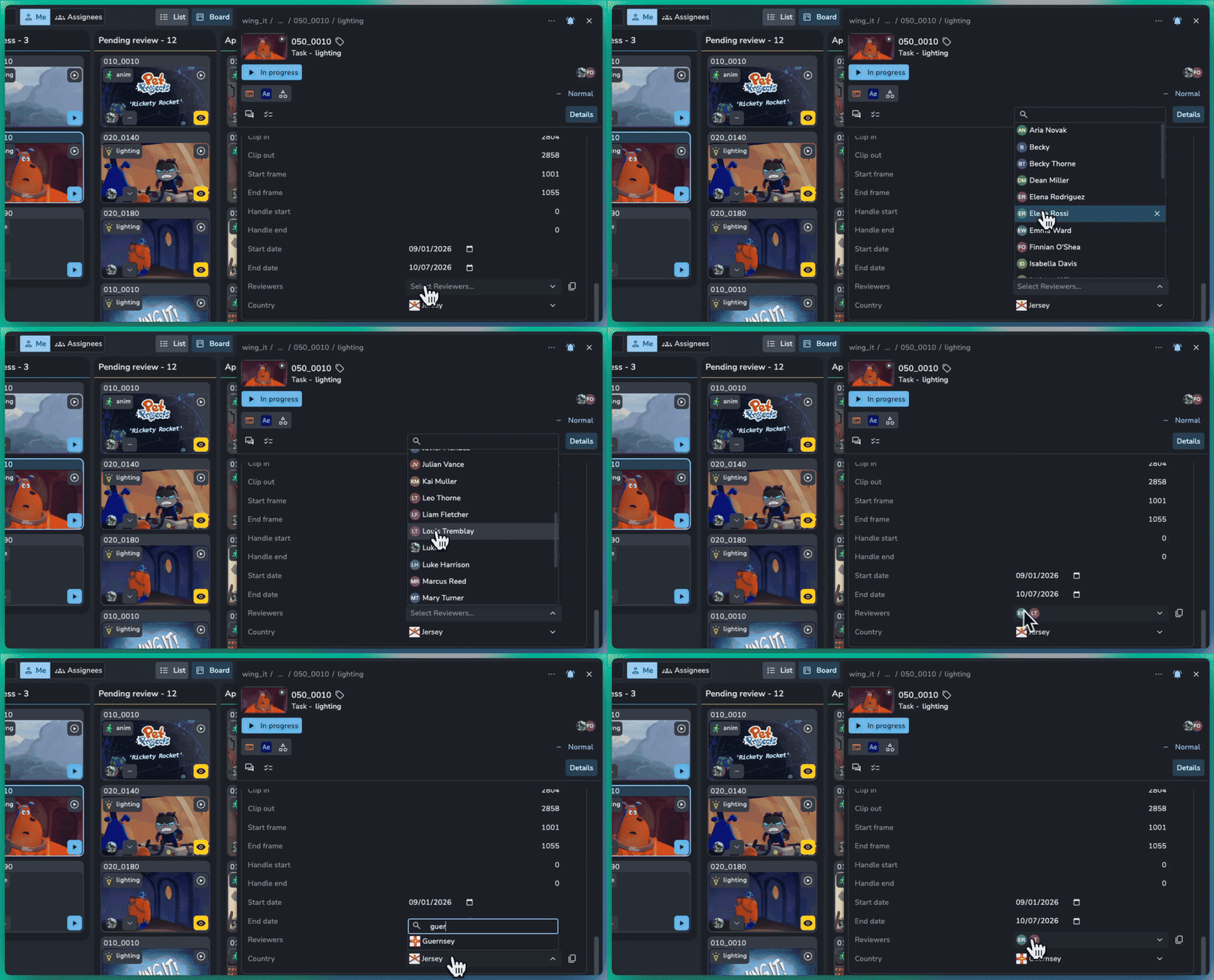
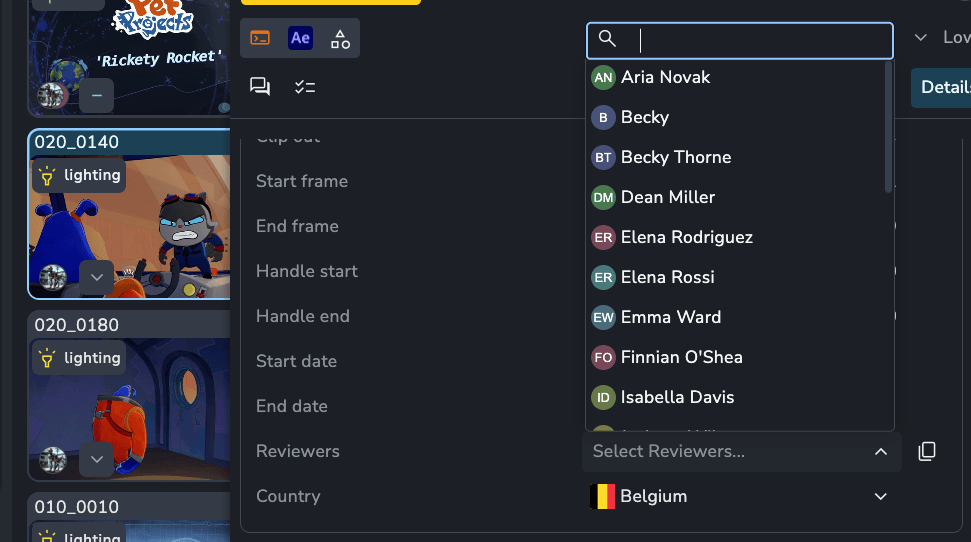
Attribute options no longer have to be typed in by hand. Pick an Enum source in the attribute editor and the list stays up to date on its own. For example:

  • Reviewers: Create a multi-select on tasks that uses the Users source. New users show up automatically, and you can hide inactive ones.

  • Statuses: Offer the statuses of the project you are working in.

  • Addon sources: Addons can provide their own, like countries by region or options pulled from another service.

AYON attribute editor panel overlaying a shot detail view, displaying the Reviewers dropdown menu open with a searchable list of studio users and country selection.
AYON attribute editor showing the open Reviewers dropdown menu with user options.

๐Ÿฐ Slice by Multiple Things

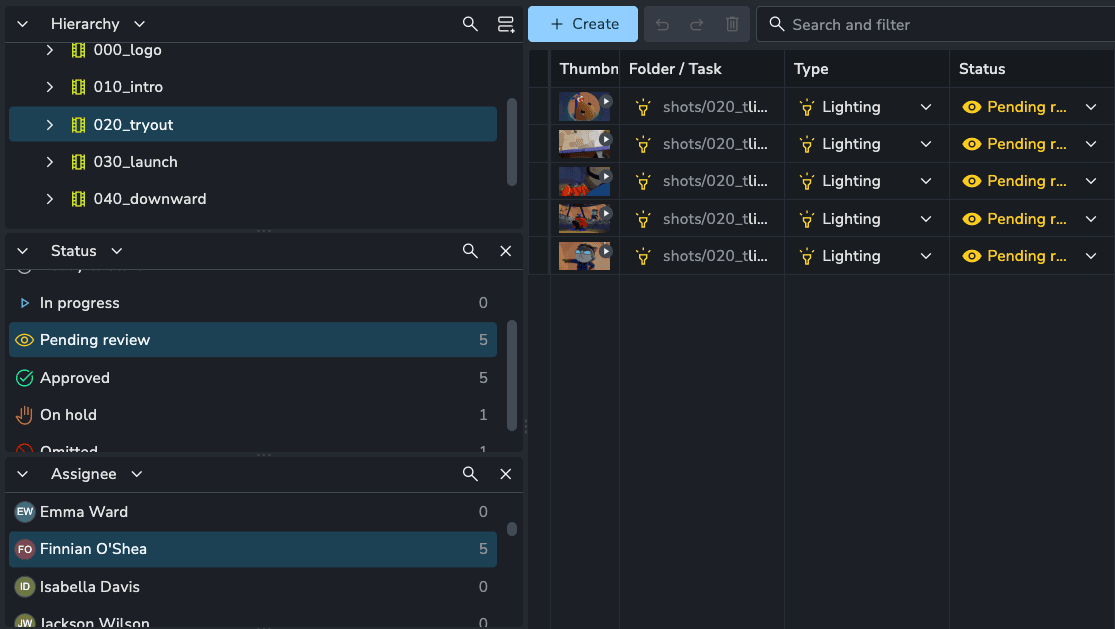
The slicer can now be split into stacked panels whose selections combine, so you can narrow down a project from several angles at once, such as a folder hierarchy alongside a status or assignee. Each panel can be collapsed down to a header that shows what it slices.

Multi-slicing is a Powerpack feature. Without a license, only the first panel is used.

AYON Slicer panel split into stacked multi-slicing panels for Hierarchy (020_tryout), Status (Pending review), and Assignee (Finnian O'Shea), filtering the task list table to matching items.
AYON Slicer panel split into stacked panels filtering tasks by hierarchy, status, and assignee.

๐Ÿ“ฆ Parent Columns on Products & Lists

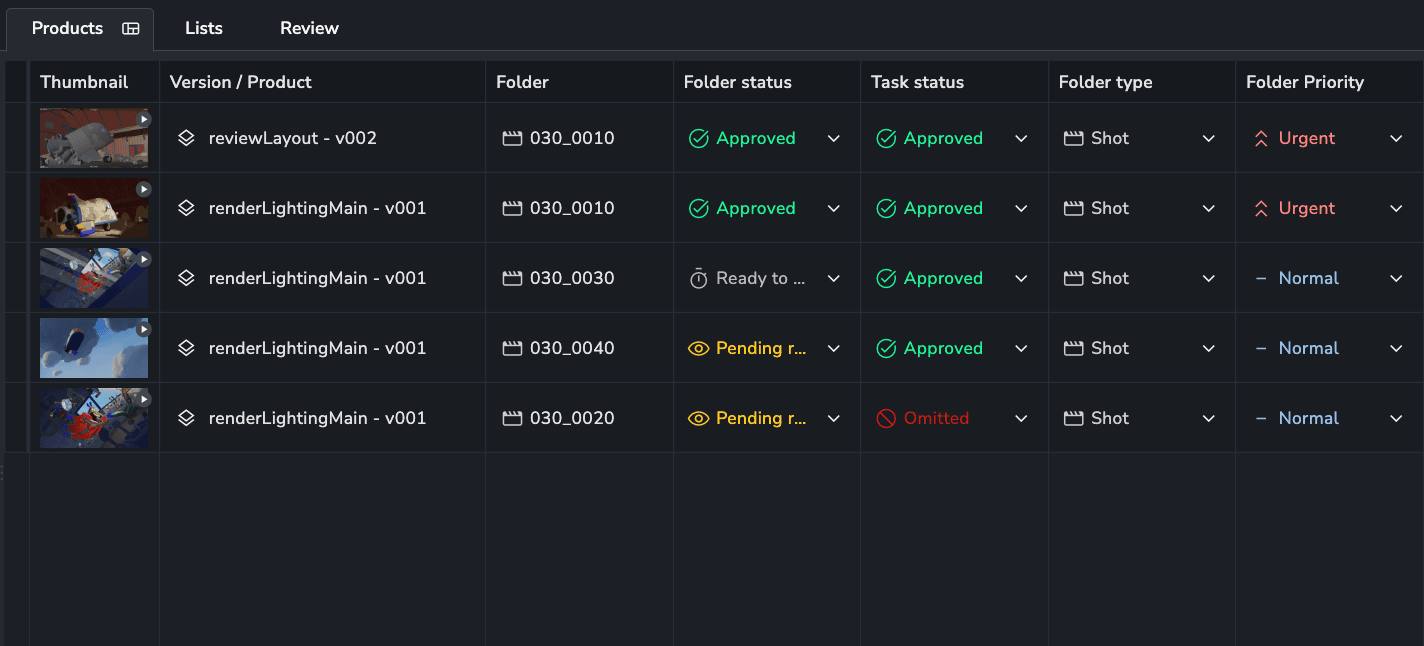
You can now add folder and task columns for versions on the Products and Lists pages. This gives you more information about their parents, be that a shot (folder) status or a linked task's assignee.

AYON Products page table view displaying parent folder and task columns (Folder, Folder status, Task status, Folder type, and Folder Priority) alongside version entities.
AYON Products table displaying parent folder and linked task attribute columns for published versions.

๐Ÿ“ฅ Inbox Improvements

A few updates to help you stay on top of what is current:

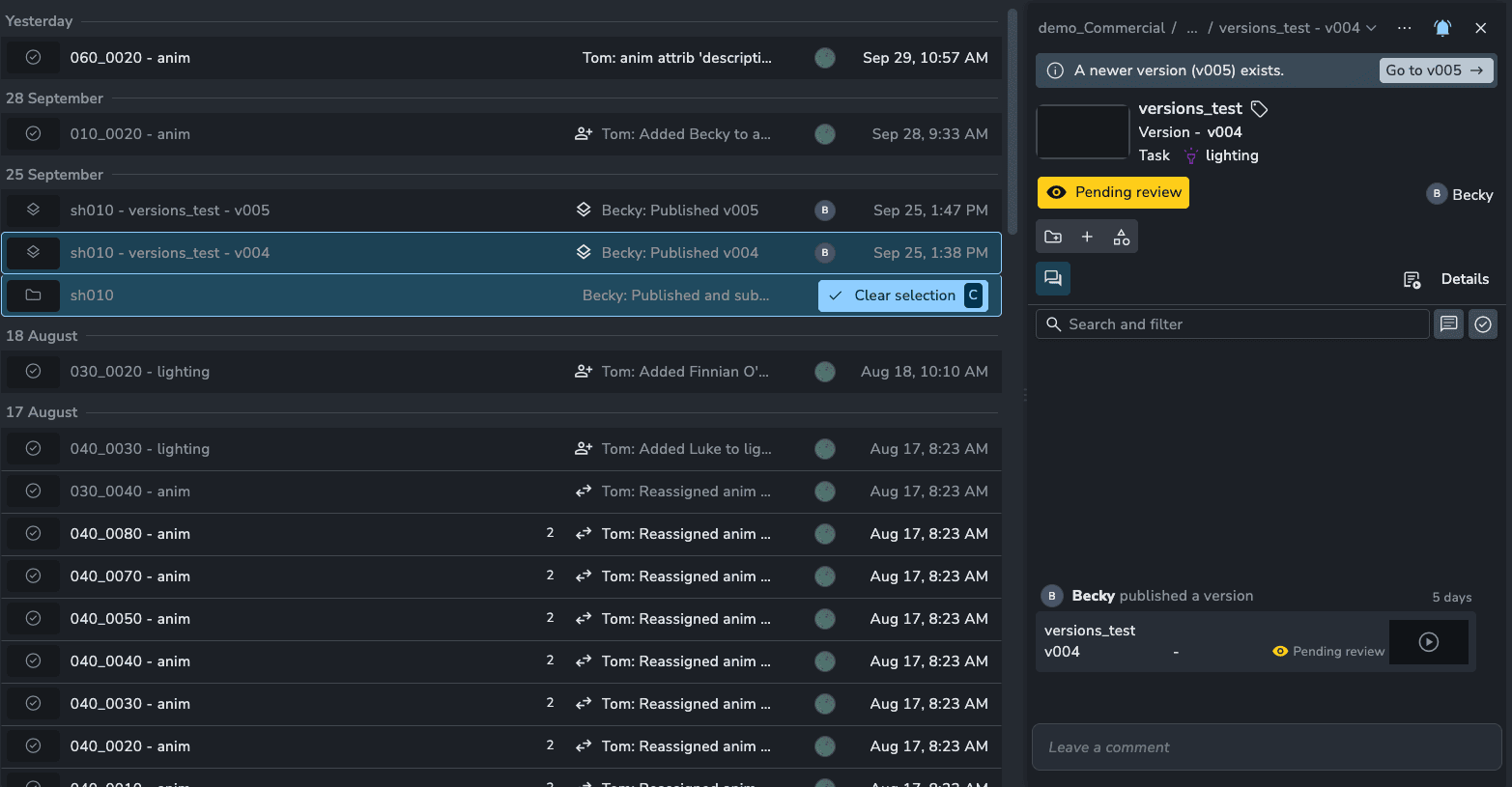
  • Newer version banner: Selecting an outdated version now shows a banner naming the latest version, with a shortcut to jump straight to it.

  • Day dividers: Messages are grouped by day, with timestamps and tooltips showing exactly when something happened.

AYON web interface displaying an Inbox notification panel for version versions_test - v004 under shot sh010, highlighting a notification banner indicating a newer version (v005) exists with a direct button to navigate to v005.
AYON Activity Feed showing a new version alert banner.

๐ŸŽ‰ New Features

  • Attributes: Dynamic enums #2283

  • Slicer: Slice by multiple things at once #2294

  • Products: Folder, task and product columns #2260

  • Inbox: Show a banner when a newer version exists #2355

  • Services: Container registry authentication #1108 #2296

โค๏ธ Improvements

  • Entity picker: Thumbnails #2279

  • Lists: Add Copy link button to Share tab #2317

  • Inbox: Day dividers, timestamps and tooltips #2318

  • Inbox: Added itemFilter for more control over updated messages #1122

๐Ÿ› ๏ธ Bugfixes

  • Comments: Loading indicator when posting multiple annotations or comments #2288

  • Comments: Open mentions in the project of their own editor #2348

  • Comments: Fix annotation ranges displaying as NaN if frameStart attribute isn't present #2354

  • Search filter: Fix custom date range dialog #2313

  • Viewer: Opening the viewer now focuses the dialog #2314

  • Player: Split arrow keys between entities and reviewables #2331

  • Entity panel: Hide play icon when there are no reviewables #2330

  • Products: Copy full product and version labels from the table #2361

  • Table: Disable sorting for multi-select custom attributes #2362

  • Shortcuts: Limit new entity T/N/M shortcuts to the overview #2356

  • Links: Fix entity picker closing and links not loading in flat folder view and entity lists #2366

  • Errors: Standardized error messages #2328

  • Lists: Fix explicit column order in list loader #1123

  • Bundles: Auto-remove addons from a bundle if they were removed #1102

  • Projects: Transaction error handling when saving a project #1134

๐Ÿ“š Resources

Note: Ynput cloud hosted instances have automatic, scheduled updates. Self-hosted servers require you to update yourself How to Update Your AYON Server.
Server

Planner 2.1.0 - ๐Ÿ“ˆ Capacity & Workload Tracking

Plan resource availability and balance workloads with the new Capacity and Workload features in Planner.

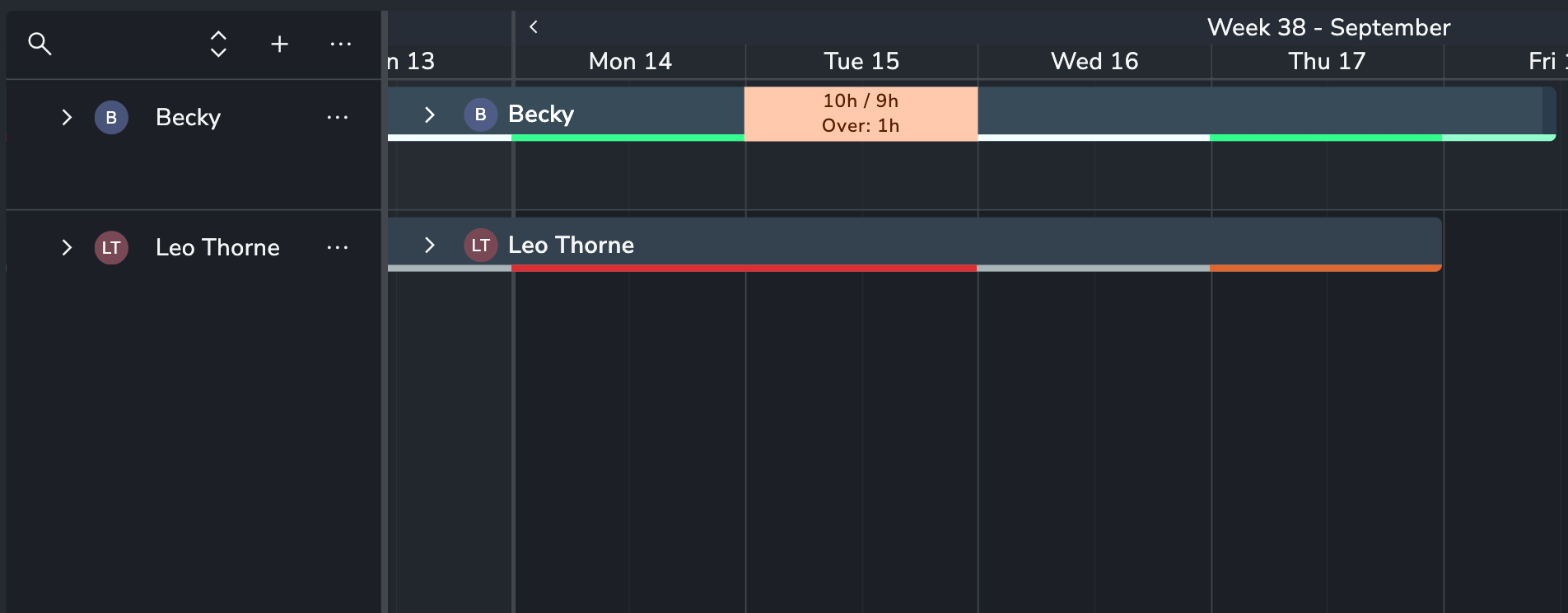
๐Ÿ“ˆ Capacity & Workload

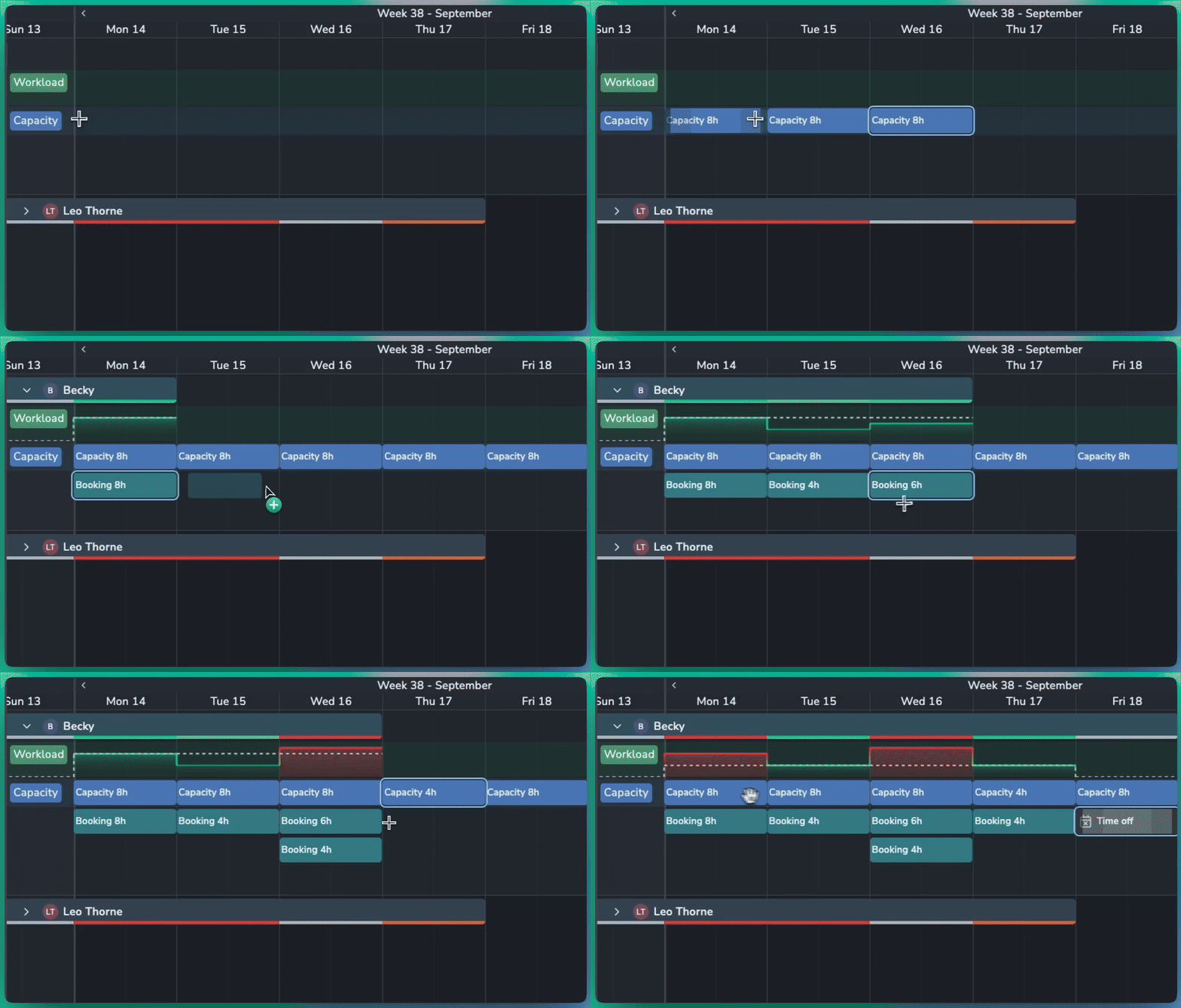
  • Set Capacity: Define how many hours a resource is available to work, either for a specific day or across a longer period.

  • Hours per Day: Set a daily capacity, such as 8 hours per day, and Planner automatically calculates the total for the selected period.

  • Workload Graph: Compare booked work against available capacity. The dotted line shows the resource's total capacity for each day.

  • At-a-Glance Status: Quickly identify workload levels:

    • โšช Grey: Capacity is available

    • ๐ŸŸข Bright green: Workload matches capacity

    • ๐ŸŸ  Orange: Booked slightly over capacity

    • ๐Ÿ”ด Red: Booked significantly over capacity


Smarter Scheduling

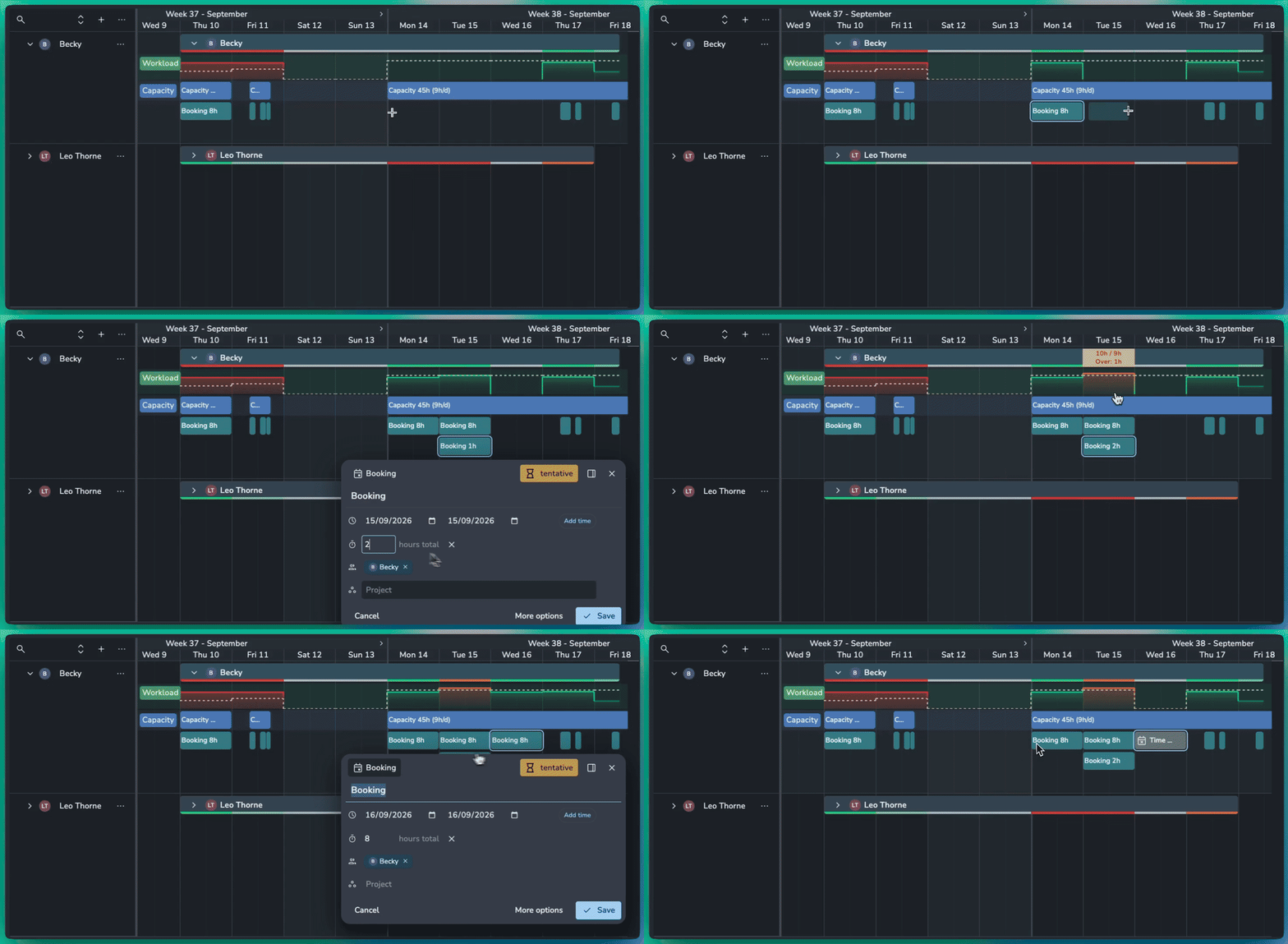
  • Time Off: Mark a booking as Time Off to set capacity to zero for that period and highlight any conflicting work.

  • Specific Hours: Create specific hours of capacity or bookings like from 9am-5pm.

  • Flexible Bookings: Set the number of hours a booking uses, even when it spans multiple days. For example, an 8-hour booking across two days can represent 4 hours of work per day.

๐Ÿ› ๏ธ Planner Improvements

  • Duplicate Events: Quickly duplicate bookings or capacity to the next day or week.

  • Move Events: Move bookings and capacity forward by day or week without dragging them manually.

Planner is a premium addon included with the Studio subscription, or as an extra with a Pro subscription.

Server

Earlier updates