Reports 0.3.14 - Text Cards & Dashboard Filters
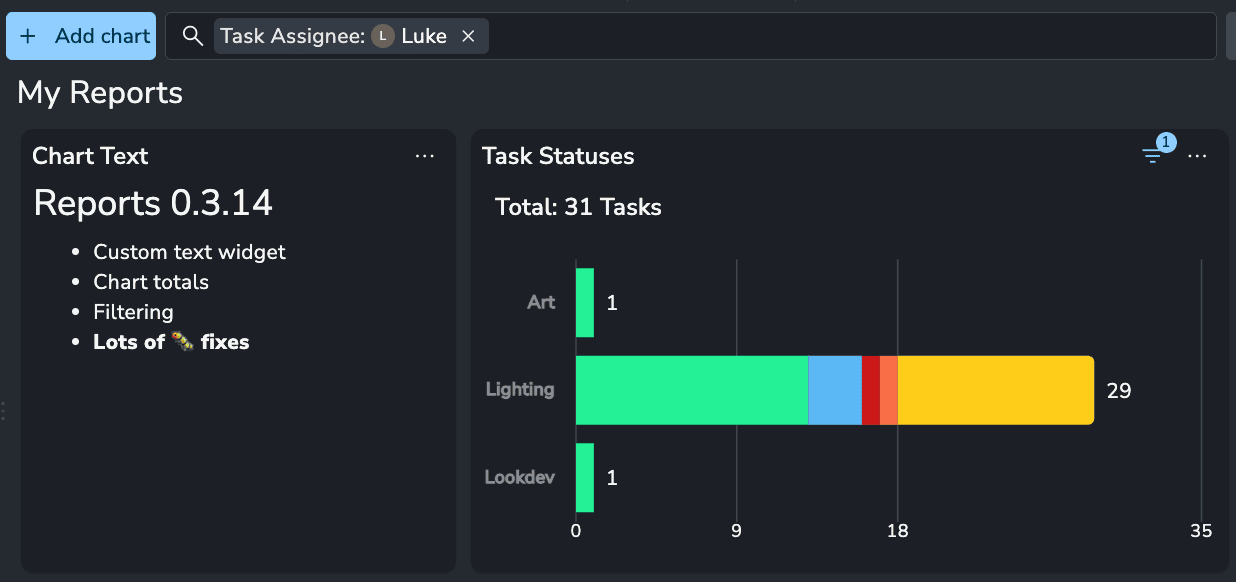
Filter whole dashboards or single charts, add text cards for context.
🔍 Dashboard and Chart Filters
Filters now work on the whole dashboard, and on each chart on its own.
Dashboard filter bar: Filter tasks, folders and versions across every chart at once.
Per-chart filters: Give one chart its own filter, for example a single status.

📝 Text Cards
Add text cards to a dashboard for titles, context and conclusions next to your charts.
Titles: Name each part of a dashboard, and rename any chart or card by double-clicking its title.
Conclusions: Write what a chart means, so the next reader does not have to guess.

❤️ Improvements
Chart totals: Each chart shows a total, and every bar or pie segment shows its count.
Quick editing: Double-click a chart to open its editor.
Smoother loading: Charts load without a placeholder or colour flash.
🛠️ Bugfixes
Grouping by a boolean attribute shows separate True and False groups.
The Group by and Segmented by dropdowns scroll again.
Line charts no longer show a random made-up series.
Timeline charts now follow the chosen frequency, so Day shows one bar per day.
Assignees and tags are counted once per entity, so totals match the real count.
Averages, minimums and maximums show a gap, not zero, for groups with no values.
Deleted tasks and versions drop out of history charts, and renamed folders show their new name.
Reports is a premium addon included with the Studio subscription, or as an extra with a Pro subscription.